LakeFlow
Recent items mentioning LakeFlow across the Databricks ecosystem — releases, news, videos, and community Q&A. Updated hourly.
What is LakeFlow?
Lakeflow is the umbrella name for data engineering on Databricks. It bundles four pieces into one product: Lakeflow Connect for ingesting data from databases, enterprise applications, files, and message buses; Lakeflow pipelines for declarative batch and streaming transformations in SQL and Python; Lakeflow Jobs for orchestration and production monitoring; and Lakeflow Designer, a visual data preparation tool for building transformation workflows using a drag-and-drop canvas or natural language prompts.
The point is consolidation. Ingestion, pipeline logic, and scheduling used to be separate products with separate names, Delta Live Tables and Workflows among them. Lakeflow puts them behind one surface, so the connector that lands your data, the transformations that shape it, and the schedule that runs it live in one place. The pipelines layer is declarative: you state the tables you want, and the engine works out execution order and incremental processing.
Lakeflow reached general availability in June 2025. Its pipeline layer is built on Apache Spark Declarative Pipelines, a framework in the open source Spark project, and runs on the Databricks Runtime while staying interoperable with the open source version. Designer came later and entered Public Preview in April 2026.
What happened to Delta Live Tables (DLT)?
DLT was renamed and became the pipelines layer of Lakeflow. Databricks says the framework is fully backward compatible with existing DLT pipelines, so nothing needs rewriting to adopt the new capabilities.
Is Lakeflow generally available?
Yes. Databricks announced general availability on June 12, 2025, covering Connect, the pipelines layer, and Jobs. Lakeflow Designer arrived later and is in Public Preview.
Is Lakeflow Jobs the same as Databricks Workflows?
Yes, Lakeflow Jobs is the new name for Workflows, the platform's native orchestrator. At GA, Databricks said it was running over 110 million jobs per week. Databricks described the change as evolving Workflows into Lakeflow Jobs and unifying it with the rest of the data engineering stack, not as a migration.
Do Lakeflow pipelines lock me into Databricks?
The framework underneath, Apache Spark Declarative Pipelines, lives in the open source Spark project. Lakeflow pipelines are built on it and stay interoperable with it while running on the Databricks Runtime, so the Databricks-specific part is the managed runtime and platform integration rather than the pipeline model itself.
Sources: Data engineering with Databricks (Lakeflow overview), Databricks docs · Announcing the General Availability of Databricks Lakeflow, Databricks blog · Announcing the Public Preview of Lakeflow Designer, Databricks blog
Lakeflow Connect now ships native managed connectors for Atlassian (Jira, Confluence), SharePoint, Google Workspace, GitHub, and AI providers like OpenAI and Anthropic, landing structured and unstructured data directly in Unity Catalog 3. The connector catalog is also moving fast, with NetSuite reaching GA 1 and a LinkedIn Ads connector entering Beta 2. Practitioners are weighing CDC options (Lakeflow Connect vs. Debezium vs. custom Spark) and asking about integrated CDC pipeline costs 78, while Lakeflow Designer offers no-code SQL pipelines 10.
Generated daily from the 10 most recent items mentioning LakeFlow. Click any [N] to jump to the source.
Lakeflow Connect | NetSuite Connector (GA)
Lakeflow Connect's NetSuite connector is now GA! It provides a managed, secure, and native ingestion solution that accesses NetSuite data through the SuiteAnalytics Connect JDBC driver and lands it in Databricks. The connector supports incremental ingestion, SCD Type 2, and automated schema evolution! Try it now: Set up NetSuite as a data source Create a NetSuite connection in Catalog Explorer Create the ingestion pipeline via the UI, a Databricks notebook, or the Databricks CLI submitted by /u/Brickster_S [link] [comments]
Lakeflow Connect | LinkedIn Ads Connector (Beta)
Lakeflow Connect's LinkedIn Ads connector is now available in Beta! It provides a managed, secure, and native ingestion solution for LinkedIn Ads resource tables (ad accounts, campaign groups, campaigns, and creatives), as well as seven pre-built reports covering daily campaign and creative performance plus monthly member demographics. Try it now: Enable the LinkedIn Ads Beta: Workspace admins can enable the Beta via: Settings → Previews → "Lakeflow Connect for LinkedIn Ads" Set up LinkedIn Ads as a data source Create a LinkedIn Ads connection in Catalog Explorer Create the ingestion pipeline via a Databricks notebook or the Databricks CLI submitted by /u/Brickster_S [link] [comments]
Unify your productivity and AI data with Lakeflow Connect
Lakeflow Connect now offers native, fully managed connectors for Atlassian (Jira, Confluence), Microsoft SharePoint, Google Workspace (Drive, Outlook, Gmail), GitHub, and AI providers like OpenAI and Anthropic, with unified governance and no infrastructure to manage. Because both structured and unstructured data land directly in Unity Catalog, teams can power enterprise knowledge bases, AI agents, and developer productivity dashboards without building custom API integrations or pipelines.
 Tutorials
Lakebase Search: Build AI Retrieval for Agents with Lakebase Postgres
Lakebase Postgres introduces lakebase vector and lakebase text extensions to support hybrid search for AI agents. It leverages the Databricks Lakehouse architecture to synchronize and index data for efficient vector and full text search without requiring external databases.
Pipelines Editor - "Run selected code" ignores the pipeline's default catalog/schema, but "Run file" uses them
I know the Databricks SDP crew hangs out here, so I wanted to just surface one inconsistency in the Lakeflow Pipelines Editor that is tripping up our new analysts and request it be reviewed for a possible enhancement. The request is to have "Run selected code" start its session with the pipeline's default catalog and schema, the same way pipeline runs do. If there's a reason it can't, a note in the Query Results panel showing which catalog/schema the query ran against would at least make the behavior visible. As far as I can tell, the editor docs don't mention it either. The editor shows the pipeline's catalog and schema right there, so the natural assumption is that everything on that page uses them. When it doesn't, users conclude the table or pipeline is broken. I know they can use either.... Add USE CATALOG / USE SCHEMA to the selection, or Temporarily hard-code three-part names, which you then must remember to remove before committing (a real risk with bundle-deployed, per-user schemas). ...but that means they're messing with the code, which leads to leaving those bits in the SQL later. Thanks. Otherwise the editor has been great! submitted by /u/lofat [link] [comments]
Beyond the Dashboard: Why AI Data Assistants Fail Without Unity Catalog Governance
For years, the promise of self-service BI has been a moving target. We gave business users drag-and-drop tools, semantic layers, and natural language query bars. Yet, time and again, we hit the same wall: trust. When a business user asks an AI tool, "What was our fleet downtime last quarter?" , the AI is only as good as the underlying data fabric. If your data is trapped in fragmented silos, uncatalogued, and un-governed, conversational AI quickly becomes an expensive generator of confident misinformation. This is where the paradigm is shifting. With the introduction of tools like Databricks Genie , we are moving past rigid dashboards into the era of conversational analytics. But as Solution Architects, our job isn't just to look at the UI layer—we have to look at the spine of the architecture. Here are three architectural realities I’ve learned while implementing modern Lakehouse patterns: 1. AI Without Governance is Just Automated Chaos You cannot point an LLM at a raw storage bucket and expect accurate insights. Genie relies entirely on the metadata, table descriptions, and foreign key relationships defined in Unity Catalog . If your governance layer is messy, your AI's answers will be messy. Unity Catalog isn’t just a security tool anymore; it is the semantic foundation for enterprise AI. 2. The Shift from "Building Pipelines" to "Curating Context" Tools like Lakeflow Connect and automated ingestion frameworks are taking over the heavy lifting of ETL. As data engineers and architects, our value is no longer measured by how many custom Spark scripts we write to move data. Our value is measured by how well we curate the Gold layer —structuring tables, defining clear column descriptions, and setting up quality expectations so that tools like Genie can actually understand the domain context. 3. Real-Time Trust Beats Real-Time Speed In heavy industries—like managing IoT telemetry for gas turbines—getting data in 5 seconds doesn't matter if the data quality is flawed. Integrating Delta Live Tables (DLT) Expectations as a quality firewall before data hits the consumption layer ensures that both human analysts and AI assistants are querying verified, pristine data. The Takeaway Conversational AI and natural language agents like Genie are the future of data consumption. But they are built on a simple architectural truth: Garbage in, hallucination out. If we want business users to trust AI-driven insights, we have to start by modernizing our foundations with robust governance, automated pipelines, and strict data quality gates. Curious to hear from other architects out there: Have you started deploying conversational AI tools to business users yet? What are the biggest governance or data trust hurdles you've had to overcome? submitted by /u/SalamanderOpen859 [link] [comments]
How do you handle CDC from legacy databases into Databricks: Lakeflow Connect, Debezium, or custom Spark jobs?
We’re moving data from an older Oracle database (about 20M rows in the main table, with daily inserts, updates and deletes) and trying to pick the right approach for keeping things in sync. Our constraints: -No timestamp or audit column on the source table -Can’t add triggers or change the source schema -Limited privileges on the source (no LogMiner access right now) What we’ve tried so far is a custom Spark job: we use ORA_ROWSCN to find changed rows, a key anti-join to detect deletes, and then MERGE into the target. It works, but it feels fragile, and the delete detection has to scan all keys every run. For those who’ve done this in production: -Are you using Lakeflow Connect, Debezium + Kafka, or custom Spark/JDBC jobs? -How do you handle deletes when the source has no change tracking? -Was it worth pushing the DBA team for log-based CDC access? -Any lessons on cost, reliability or maintenance? Would love to hear what’s working (or not) for you. submitted by /u/No_Ambition8323 [link] [comments]
Costing of Lakeflow Connect Integrated CDC Pipeline
Hi All, Currently I'm facing the issues in finding the costing of the integrated cdc pipelines, I'm not using serverless compute in pipelines and before 1st Oct in usage system tables we were getting the entries and in usage_metadata column we were getting the dlt_pipeline_id, but after 1st Oct this values is comming as null. Is there any other way to calculate the costing of these pipelines. submitted by /u/Swimming-Regular6674 [link] [comments]
 News
Building Reliable Data Pipelines with Lakeflow on Databricks | Lakeflow Demo
Databricks Lakeflow provides a data intelligence platform for building and managing reliable data pipelines. The demonstration covers creating delta tables, ingesting data from Salesforce using Lakeflow Connect, and using Lakeflow Designer for data transformation and orchestration.
Introducing Lakeflow Designer: No‑Code SQL Pipelines in Databricks
Would you trust a pipeline migration that skips reprocessing but keeps the streaming checkpoint?
I'm exploring newer import_checkpoint capability in lakeflow spark declarative pipelines. Suppose we have a production streaming pipeline processing millions of records daily. We want to migrate it into a declarative pipeline without reprocessing old data or losing the streaming state. But what happens if the source schema changes, some records arrive late, or the old checkpoint is no longer compatible with the new pipeline? Would you use checkpoint import in production, or would you prefer a full refresh for safety? What edge cases would you test before making the switch? submitted by /u/No_Ambition8323 [link] [comments]
 Tutorials
Tutorial: Genie for Data Engineers, Data Scientists, and Everybody Else
This tutorial demonstrates how to use Databricks Genie to build a live web app and data pipeline from a 700-million-row IoT dataset. The process covers getting the data from the Databricks Marketplace, running exploratory data analysis, building pipelines and jobs with Genie Code, querying data on mobile, and receiving shared data locally.
Databricks World. I think they forgot the Pirates of Renaming
I really liked the Databricks World map they showed at DAIS, so I decided to make my own version. But I felt like something was missing... The Pirates of Renaming Not long ago, I was trying to figure out the difference between DLT and SDP. But it seems like the last name is Lakeflow Pipelines. What should I add to the map next? submitted by /u/Significant-Guest-14 [link] [comments]
What’s new in Databricks - September 2026?
Databricks shipped the following major GA launches in September 2026: 👉 Spark Declarative Pipelines (SDP): Lakeflow Spark Declarative Pipelines now feature structured maintenance windows for continuous runs, zero-reprocessing migrations (import_checkpoint), multi-source append flows, and explicit cascade deletion (cascade: true) for Unity Catalog tables. 👉Governance and ABAC Security: Metastore-level Attribute-Based Access Control policies and explicit DENY rules are now GA in Unity Catalog, automatically enforcing data protection and access rules across all present and future catalogs. 👉Connectors and Data Applications: Lakeflow Connectors reached GA for Anaplan, Anysphere, and Celigo, while Genie Ones MCP server was officially made generally available for AI assistant workflows. Full article 👉 https://community.databricks.com/t5/product-platform-updates/what-s-new-in-databricks-september-2026/ba-p/173896 submitted by /u/Youssef_Mrini [link] [comments]
How to get the most out of running dbt on Databricks
Consolidating your entire pipeline within a single dbt project on Databricks eliminates fragmented tooling from streaming ingestion through governed metric definitions. This unified approach lets you orchestrate natively using Lakeflow Jobs while enforcing Unity Catalog access rules directly from your dbt project configurations.
Run Lakeflow pipelines as a group: governance win or a way around SP gatekeeping?
As of this month you can set a Lakeflow pipeline’s run-as identity to an account group. Tables the pipeline publishes become group-owned in UC. Two patterns I expect to see: 1. Routing around SP provisioning. In a lot of orgs, creating a service principal is process-locked by a platform or identity team. Tickets, approvals, secret rotation. With run-as group, a team that already has an account group with the right grants can skip all of that. The conversation moves from “who can create an SP” to “can we just use the DE group?”. 2. Lower-maturity teams leapfrogging SPs. Teams still running pipelines as individual users will likely jump straight to groups. That’s better than personal identities, since nothing breaks when someone leaves. But it means they may never adopt SPs at all, and “good enough” becomes the permanent pattern. Questions for the sub: If you run pipelines as SPs today, are you planning to switch any to groups? Platform/admin folks: are you going to restrict this, and how? How are you handling auditability when the identity is a group instead of a single SP? Is group run-as a legit middle step for teams coming off user identities, or a dead end? My take: SPs still belong in prod. But I’d bet most orgs end up with group run-as spreading through both of these doors, and won’t notice until an audit asks who ran what. submitted by /u/OkImprovement7010 [link] [comments]
 News
Databricks Breaking News: Lakeflow Jobs, DABs, Apps, AI, Private Network Gateway
The video covers multiple new updates in Databricks, including Lakeflow connectors, task value loops, state repartitioning, DAB enhancements, SQL functions, serverless version 6, Unity Catalog skills, app spaces, and network gateways. It demonstrates how to configure Lakeflow job tasks, implement task value loops, and manage serverless compute permissions and environments.
Anyone tried Declarative Pipelines for metadata driven pipelines?
I've been trying out Lakeflow declarative pipelines for a transformation framework I'm building, and it looked like a really good fit. The idea is to drive transformations from contracts rather than maintain a separate table declaration for each table/pipeline for each final object. Depending on the configuration, the framework handles full or incremental loads and SCD1/SCD2. Having the dependency graph and DQ expectations in the same place was a big reason I wanted to try it. I built a POC, and there's a lot I like about the approach. Where I'm getting stuck is fitting the outputs to the client's existing conventions. For example, with AUTO CDC's SCD2 handling, we get __START_AT and __END_AT , while the client expects specific validity/watermark column names and an isCurrent field. We also have other required fields to preserve in the output. These conventions are already used downstream, so changing them means more than updating the pipeline. A view could handle the SCD2 naming and derive isCurrent . That part is doable. But as I work through the remaining requirements, I'm adding more logic around the pipeline outputs, and I'm less sure how much simpler the overall solution would end up being. That's the trade-off I'm trying to work out. Declarative pipelines covered a lot of what I wanted, but accommodating the existing requirements adds overhead that makes it harder to justify adopting them for this particular solution. At the moment, it doesn't look likely, although I haven't ruled it out. What are you using declarative pipelines for? Have you run into similar issues fitting them into an existing setup, and did you find the extra layers worth maintaining? submitted by /u/postnav64 [link] [comments]
Databricks in a SaaS product, and the realtime mode
Hey everyone, i have two questions about databricks and I’d like to hear about your experiences: 1. I have seen a lot of companies who use databricks for their own internal needs and that makes sense. But have you ever seen a SaaS product that uses databricks? For example a products that process customer data to provide some value? Do you know if there is any company that uses databricks structured streaming realtime mode in production? Do you know if they are happy with it? I am asking this because it is a new offering and there is no support for features such as auto scaling (unless if you are using lakeflow pipelines). And i assume it is super expensive as you need a core for every task slot. submitted by /u/shanfamous [link] [comments]
Possible bug in Lakeflow Connect SQL Server ingestion with GUID primary keys – Missing records
trim_array: remove elements from an array
Databricks runtime 19 brings the new Spark function trim_array. trim_array(array(‘A’, ‘B’, ‘C’, ‘D’), 2) returns [‘A’, ‘B’]. A count of 0 keeps the array; a count equal to its length returns an empty array. https://medium.com/databrickscommunity/databricks-news-serverless-genie-code-ltap-lakeflow-61853d8e422a submitted by /u/hubert-dudek [link] [comments]
The New Databricks Lakeflow Designer Is a Game Changer!
Resize streaming partitions
On-demand state repartitioning lets you change streaming state partitions while the stream is still running: set spark.sql.streaming.stateStore.partitions and restart the streaming query, or set it in a Lakeflow table’s spark_conf before the next update. The ability to finally handle complicated scenarios liek that one in Declarative Pipelines is also a big improvement. And checkpoints survive repartitioning. more news https://medium.com/databrickscommunity/databricks-news-serverless-genie-code-ltap-lakeflow-61853d8e422a submitted by /u/hubert-dudek [link] [comments]
DABs in the Wild
Our team is a team of engineers responsible for centralized analytics and infrastructure on Databricks. We went live about 2 years ago and implemented a monolithic repo structure where we save all of our code including ci/cd, functions, sql, notebooks, lakeflow job yml, to a single repository that also deploys the common development (notebooks) to the Workspace.. Knowing this setups explicit limitations, we're working on implementing DABs into our team norms (already adopted on a very small ad-hoc scale) which will bundle each projects files together into its own unit of work, and will still be managed via our repository under /bundles directory. We'll have a GitHub action watching this directory and will deploy changes when they happen to that directory specifically. With this solution though, we could potentially get a ton of projects within the /bundle directory over time with other limitations as well. This got me curious what other teams workflow/architecture is around DAB's and how do you have it setup within your databricks environment and how have you scaled it within a team? submitted by /u/RunningOnDadrenaline [link] [comments]
What's New in Lakeflow Designer - October 2026 Roundup
Lakeflow Designer now includes new operators for data cleaning, deduplication, quality checks, and flexible joins, along with canvas support for materialized views, table merges, and live cursor presence. The update also previews upcoming additions, such as Databricks Apps integration, full-output data profiling, and native migration tooling with Lakebridge.
Nanosecond timestamps
Databricks added nanoseconds precision TIMESTAMP(9) and TIMESTAMP_NTZ(9). TIMESTAMP(9) 09:30:00.123456789 would be 09:30:00.123456 as ordinary TIMESTAMP. more news https://medium.com/databrickscommunity/databricks-news-serverless-genie-code-ltap-lakeflow-61853d8e422a submitted by /u/hubert-dudek [link] [comments]
Lakeflow Connect SQL Server (integrated CDC pipeline): no way to Include/exclude columns
Use multiple triggers for Lakeflow Jobs
A Lakeflow Job can now have up to five independent triggers. Any active trigger can start the job. For table updates, specify whether all or any monitored table must change; in DABs, use ALL_UPDATED or ANY_UPDATED. more news https://medium.com/databrickscommunity/databricks-news-serverless-genie-code-ltap-lakeflow-61853d8e422a submitted by /u/hubert-dudek [link] [comments]
Multiple triggers on one Lakeflow job (beta): finally killing the duplicate “month-end close” job
I can't tell you how many times I've heard this common finance ask: refresh reporting tables daily at 6 AM, but during month-end close, run every hour plus whenever the ERP drops a reconciliation batch. Until now that meant multiple jobs pointing at the same notebooks (or a parent job with run-job tasks), and keeping parameters and dependencies in sync across both. There’s now a beta feature that allows multiple triggers on a single job: Enabled per workspace by an admin under Previews (“Multiple Triggers”) Up to 5 triggers per job during preview Mix types: multiple crons, table update, file arrival Each trigger pauses/resumes independently In DABs / Jobs API you define a list of triggers instead of the single schedule block Gotcha: any trigger firing starts the job, and max concurrent runs defaults to 1. If a file-arrival run is still going when the cron fires, the second run (queues/is skipped, depending on your queue setting). Worth testing the overlap before you put this on anything high priority. Has anyone tried this yet? Curious how others are finding uses for this. submitted by /u/OkImprovement7010 [link] [comments]
Run jobs and pipelines as a group
You can now run pipelines as a group, avoiding dependency on a single principal (user or SPN). Databricks CLI 1.20.0 adds run_as.group_name at the bundle and target levels. The group needs its own workspace and data permissions; it does not inherit a member’s personal access. more news https://medium.com/databrickscommunity/databricks-news-serverless-genie-code-ltap-lakeflow-61853d8e422a submitted by /u/hubert-dudek [link] [comments]
SharePoint Lists ingestion is now in Beta in Lakeflow Connect
Hey r/databricks , SharePoint Lists ingestion is now available in Beta with Lakeflow Connect. You can ingest structured data from Microsoft SharePoint Lists into Delta tables. The Beta supports two ingestion patterns: Ingest one SharePoint List into one Delta table. Ingest all Lists from a SharePoint site into one destination schema, with one Delta table per List. SharePoint Lists ingestion is available through the managed SharePoint connector API. You can create a pipeline using Declarative Automation Bundles or a Databricks notebook. UI-based authoring is not available in this Beta; we are working on adding it. To try the Beta, ask a workspace admin to open Previews , search for SharePoint Lists Connector , and turn it on. Tutorial Option 1: Declarative Automation Bundle This Declarative Automation Bundle configuration ingests one List: resources: pipelines: sharepoint_list_pipeline: name: sharepoint_list_pipeline catalog: main schema: ingest_destination_schema channel: PREVIEW ingestion_definition: connection_name: objects: - table: destination_catalog: main destination_schema: ingest_destination_schema destination_table: sharepoint_list connector_options: sharepoint_options: entity_type: LIST url: https:// .sharepoint.com/sites/ /Lists/ Option 2: Databricks notebook Step 1: Open the SharePoint example notebook , select Open in Databricks or Import Notebook , and import a copy into your workspace. Step 2: Do not modify cell one. Replace the pipeline configuration in cell three with the following, updating the placeholders: pipeline_spec = """ { "name": " ", "catalog": "main", "schema": "ingest_destination_schema", "ingestion_definition": { "connection_name": " ", "objects": [ { "table": { "destination_catalog": "main", "destination_schema": "ingest_destination_schema", "destination_table": "sharepoint_list", "connector_options": { "sharepoint_options": { "entity_type": "LIST", "url": "https:// .sharepoint.com/sites/ /Lists/ " } } } } ] }, "channel": "PREVIEW" } """ create_pipeline(pipeline_spec) Step 3: Click Run all to create the pipeline. Ingest multiple SharePoint Lists If there are multiple SharePoint Lists you want to ingest in the same pipeline, simply create a separate table object within the same pipeline spec definition and point the url at the Lists you're interested in. The SharePoint connector also supports ingesting all of the SharePoint Lists across an entire site. For site-level ingestion, follow the same steps above, but use a schema object instead of a table object and point the url to the SharePoint root site. Each List is written to its own destination table. Limitations: The current Beta does not support tenant-wide List ingestion nor SharePoint List attachments. See the documentation for complete Declarative Automation Bundle and Databricks notebook examples, including site-level ingestion. If you try it, let us know what kinds of Lists you are ingesting and where you run into friction. submitted by /u/BricksterJ [link] [comments]
Sybase connectors
Are there any Lakeflow connect connectors for SybaseIQ? submitted by /u/RazzmatazzLiving1323 [link] [comments]
Announcement: Environment variable support for serverless notebooks and jobs
Hey all, you asked and we listened - env var support is in beta for serverless notebooks and jobs! Have you been wanting to run DBT tasks but need environment variable support? This feature is for you! ✅ Do your whl or notebook tasks just need a way to inject environment variables at runtime? This feature is for you, too! ✅ Do you just love the environment? That's awesome, me too, but this feature won't help you with that. ❤️ 🌎 How to try? Ensure that the feature is enabled in the preview portal (with admin perms if it isn't already)- grep on ` Environment variables in Lakeflow Jobs` How does it work? Jobs UI > Click `Select environment variables` > `+ Add environment variables`. https://preview.redd.it/vf3y80jbvwth1.png?width=1636&format=png&auto=webp&s=e68cec5c30394ecb5b982f3809c88fc387414a1f Then create a name `production` for the env var collection (that way you can reuse it on multiple tasks), fill out your key-value pairs, and/or or paste in the file path to a .env file. Note: We will add a file picker for choosing the .env file in an upcoming release - thanks for being patient https://preview.redd.it/8c606502vwth1.png?width=1762&format=png&auto=webp&s=5ac9bca037c793c8758ce8b4625fb26b28a16a1a Jobs API > Define a collection via a key e.g.,`production` and use it on many tasks. "tasks": [ { "task_key": "process_orders", "notebook_task": { "notebook_path": "/Workspace/Shared/process-orders" }, "environment_key": "default", "environment_variables_key": "production" } ], "environments": [ { "environment_key": "default", "spec": { "environment_version": "5", "dependencies": [] } } ], "environment_variables": [ { "environment_variables_key": "production", "spec": { "variables": { "APP_ENV": "production", "REGION": "us-west-2" }, "files": ["/Volumes/company/default/prod/execution.env" , "/Volumes/company/default/prod/format.env"] } } ] ] Finally, consume it in your code: 🤓 import os app_environment = os.environ["APP_ENV"] Temporary limitations : these will be fixed within a week or so - I'll update this post Env vars will not propagate to regular UDFs (aka non-UC) Defining an env var's value from a secret Learn more : https://docs.databricks.com/aws/en/jobs/environment-variables Provide any and all feedback. Also, what other features you'd like to see? (Asking for a friend as roadmap planning is starting soon!) Thanks! submitted by /u/justinAtDatabricks [link] [comments]
How to Repoint dbt ETL Pipelines to Databricks
Existing dbt projects can be repointed from any source warehouse to Databricks with minimal code changes. Follow practical guidance covering adapter setup, namespace mapping, SQL dialect differences, production scheduling with Lakeflow Jobs, and model-by-model validation for a safe cutover.
What changed on Lakenaut after your feedback, and the site is now an MCP server you can plug into Claude
First of all, I really want to thank you everyone commented my latest post and encourage me to keep update and mantain the website. For the ones who miss my post is this one (for reference): https://www.reddit.com/r/databricks/s/S06gTMmm2P A few of you wrote in over the last two weeks, and most of it is live now. The short version, then one bigger thing. From the feedback "Too many categories, the docs' hierarchy is clearer." The sidebar groups now follow the Databricks documentation's domains (Platform & governance, Data engineering · Lakeflow, Data warehousing & BI, AI & ML), while each area keeps the name the workspace menu gives it. The sidebar is contextual: the doors are always there, the tree opens only where you are. "Finishing a page and moving on is one gesture." It is: Mark as done and Done, next sit together at the foot of every concept. "I want to know what moved." Every concept, area, path and roadmap now opens with a "What changed, and when" box, and /changes/ is the whole log by day: which page, what was done, and whether a person did it by hand or accepted a correction the agent drafted after the documentation changed. Every end-of-support row has its own address now, and search lands on it instead of on the list. A fifth way through the material is taking shape: practices, decision pages filed on the well-architected pillars. When to pick a thing, for whom, what choosing wrong costs. The first one is in draft. The bigger thing: an MCP server, no key Put the MCP URL (page below) into Claude, ChatGPT, Cursor or Claude Code and the assistant reads the published site instead of guessing: 170+ concepts, 8 paths, 5 roadmaps, the news, the resources, and the platform tables (what is in preview, what was renamed, what is ending). Thirteen read-only tools, 60 calls a minute per address, every answer links back to the page it came from. How to connect it: https://lakenaut.dev/developers/ Two questions If you plug it into an assistant, what is the first thing you ask it? I want to know whether people reach for prep, for "what is in preview", or for something I have not thought of. Is there a kind of page you keep wishing existed? The practices came from one comment. The next kind could come from yours. Again, thank you and let's connect! submitted by /u/imthenitto [link] [comments]
This release adds resources and data sources for private network gateways alongside Mason sessions and managed memory components. The resource exporter expands dependency support to include Lakeflow pipeline settings, model serving endpoints, Databricks Apps, cross-cloud cluster policies, and several new job task types.
Genie Code vs. Omnigent: How to structure workspace instructions, AGENTS.md, and skills without breaking production
Following up on recent discussions around Genie performance I've come across... a lot of us have a similar frustration with Genie. Context bloat, prompt drift, and agents making destructive errors (Junior mistakes like setting a mode to overwrite). Part of this is limitations of genie, some is instruction "stuffing" and some is using the right tool for the right job. Also, guidance on how to structure and create instructions have changed a lot over the summer. With Omnigent being available alongside Genie Code, here is my opinion on what should separate these tools and how to structure context files to keep agent outputs deterministic. I made a table because post sprawl is real... Genie Code vs. Omnigent These are not competing options. They solve problems in different places and scales: Layer Genie Code Omnigent (Meta-Harness) Primary Role Native in-workspace assistant for notebooks, SQL Editor, and Lakeflow Pipelines. Unified meta-harness to run, swap, and persist multi-agent workflows (Claude Code, Codex, Cursor, PI, Hermes) across local runners and cloud sandboxes. (Also, try out Debbie that has the ability to use a /debate skil) Governance Prompt-level instructions, workspace instruction files, and Unity Catalog user permissions. External, stateful policies written in CEL (hard cost limits, network sandboxing, pre-commit git checks). Best For Interactive notebook debugging, quick PySpark logic, end-to-end Lakeflow pipeline scaffolding. (Think StackOverflow, for those of us of that still remember it) Multi-repo refactoring, team co-driving sessions (eg. "Multi-player" agent sessions), and running autonomous CLI agents with guardrails. Execution Model Synchronous, interactive execution tied to your active workspace session and compute. Asynchronous, persistent execution that runs in the background (survives laptop close) with shareable web/desktop sessions. My Rule of thumb: If you are working interactively / ad-hoc in Databricks and need help with syntax, where something is, why something is failing, use Genie Code. If you are doing anything complex, want to be able to get one harness to check another one (like Claude Code checking Codex's response/PR) and need programmatic guardrails that can't be bypassed by prompt injection, go use Omnigent. And if you are using Genie and want it to read your "instructions": Databricks does not natively parse an arbitrary instructions.md dropped in a folder. If you want repo/project-level discovery, the standard Genie Code looks for is AGENTS.md (or CLAUDE.md ). Shoving context for "multiple project islands" into one file guarantees prompt dilution. Workspace defaults ( .assistant_workspace_instructions.md ) belong in under 30 lines. Scoped project rules belong in AGENTS.md . Task-specific behaviors belong in modular skills under .assistant/skills/ called via @skill-name . Andrej Karpathy created a git repo "karpathy-guidelines" that walk through some of the overarching concepts he recommends around creating skills and instructions. Specifically one of the ones that may come as a surprise is that if you repeat a instruction point it will lower the effectiveness of the instructions and cause degradation. submitted by /u/OkImprovement7010 [link] [comments]
New in Databricks: parse_sql(): SQL into JSON
Parse_sql() function extracts table references, column names, functions, and parameters from SQL. It extracts without running the query. It also reports syntax errors. more news https://databrickster.medium.com/databricks-news-serverless-genie-code-ltap-lakeflow-61853d8e422a submitted by /u/hubert-dudek [link] [comments]
PSA: old Databricks names vs new ones. Which rename got you?
Databricks has renamed a lot of features over the past year, and a lot of tutorials, blog posts, Stack Overflow answers and even AI assistants still use the old names. If you search the docs for the old name, the results can be confusing, and code samples can look unfamiliar even when you know the concept cold. The ones I see trip people up most: Delta Live Tables / DLT → Lakeflow Spark Declarative Pipelines (often shortened to Lakeflow Declarative Pipelines) APPLY CHANGES INTO → AUTO CDC APIs Databricks Asset Bundles / DABs → Declarative Automation Bundles The concepts didn't change much, but the vocabulary did. Two questions for the sub: Has a rename caught you out, at work, in docs, or in a code review? Did I miss any? I'm sure there are more, especially on the ML / GenAI side. I'll keep this list updated with whatever people add. Edit: removed Liquid Clustering from the list. Fair point from a commenter that it's a change in recommendation, not a rename. Still worth knowing though: older material treats partitioning + Z-Order as the default, and current docs recommend Liquid Clustering for new tables. submitted by /u/UnluckySugar610 [link] [comments]
App Spaces: governance for apps
Workspace admins, thanks to App Spaces, can define who can create and use apps in a given space and also set policies for apps, for example, which API scopes can be used. more news https://medium.com/databrickscommunity/databricks-news-serverless-genie-code-ltap-lakeflow-61853d8e422a submitted by /u/hubert-dudek [link] [comments]
Built a live Helsinki tram tracker on Databricks with Lakeflow, Lakebase, Genie and Apps
Lakeflow connect
 News
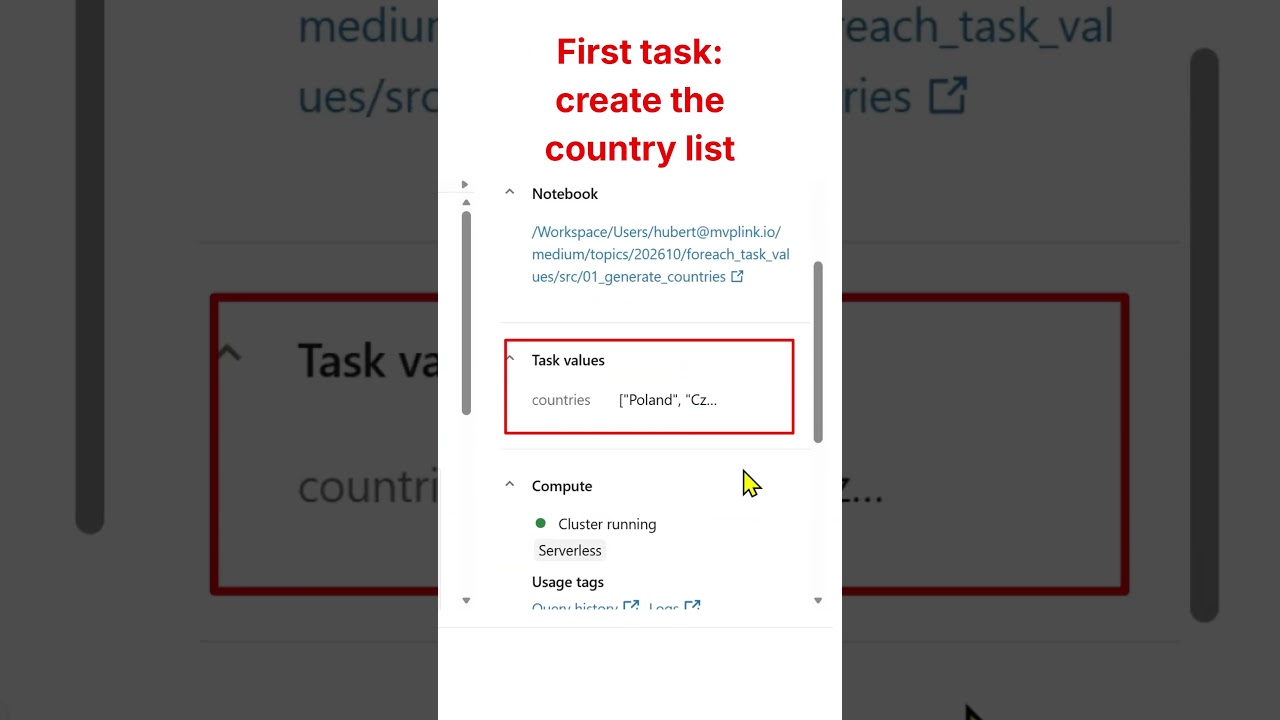
databricks TaskValue and Lakeflow - orchestrate using Python lists and arrays
databricks TaskValue and Lakeflow
Databricks taskValues can use a Python list as input into a For each loop in Lakeflow job. You can generate the list dynamically and run the same task for every country, table, file, etc. more newshttps://databrickster.medium.com/databricks-news-serverless-genie-code-ltap-lakeflow-61853d8e422a submitted by /u/hubert-dudek [link] [comments]
Lakeflow connect SQL server ingestion can be made elastic?
system.query.history is now Generally Available in Databricks
Until now, answering "which query is eating our warehouse?" or "who changed that table?" meant clicking through the Query History UI one workspace at a time. Now it is a SELECT. The table logs every statement run on SQL warehouses, serverless compute, and Lakeflow pipelines, across all workspaces in the same region. Read more on LinkedIn: https://www.linkedin.com/posts/cenh_databricks-dataengineering-systemtables-ugcPost-7511094425977016320-L7uj/?utm_source=share&utm_medium=member_desktop&rcm=ACoAABmJHrsBNAC3x3H1M58JRKoHv_l4D61n0-8 submitted by /u/Lenkz [link] [comments]
Lakeflow Jobs update! Task output in foreach now available in Beta!
If you run a ForEach task in Jobs each iteration now sets a task value and a downstream task can read all of them back as on ordered array. This feature just landed in Beta - try it out! Before this, iteration outputs weren't accessible to downstream tasks. If you wanted a later task to see per-iteration results (row counts, status and output paths), you had to write each result to a table and read it back and maintain that yourself. You also lost the built-in observability Jobs gives normal task values. How it works: Inside the iteration, set a value like you always would: dbutils.jobs.taskValues.set(key="result", value=row_count) In a downstream task, read the nested task's key. You get one array across every iteration: results = dbutils.jobs.taskValues.get(taskKey="process", key="result") # results == [1, 2, 3] Or reference it as a parameter: {{tasks.process.values.result}} An iteration that never set the key keeps its slot as null: # [1, None, 3] https://i.redd.it/clkd42sm3nsh1.gif Worth knowing: Beta, needs Databricks Runtime 15.4 LTS or above Python notebooks only The assembled array caps at about 48 KB (49,344 characters) per parameter value A single parameter value can hold up to 3 aggregated references Docs: https://docs.databricks.com/aws/en/jobs/task-values#read-values-from-a-for-each-tasks-iterations And yes we are working on increasing parameter value limits! Please let us know if you have any feedback! submitted by /u/saad-the-engineer [link] [comments]
Time to Swap the Cookies for Jetfuel - New Dataset & New Databricks Genie Tutorial
Most of you know samples.bakehouse . Great for a first query. Perfect for a quick demo. But after years of cookie sales, it's a little overbaked. Time to swap the cookies for jet fuel. ✈️ Together with the OpenSky Network , I brought a full day of global air traffic to Databricks Marketplace: 696 million real ADS-B position reports, messy just like real life. Myself, I used Genie for the whole journey: EDA, data exploration, a Apache Spark Declarative Pipeline, and a Lakeflow Job. Then I went a step further and read the same Marketplace data with open-source tools only, using OpenSharing and pandas. The result is this hands-on tutorial: Marketplace + Unity Catalog: get the data as a governed table Genie Agents: find anomalies in plain English Genie Agents: explore and visualize with maps and charts Genie Code: a Spark Declarative Pipeline, bronze to gold, with data quality rules Genie Code: a Lakeflow Job with schedule, retries, and email alerts Databricks Apps: your coding agent, governed by Unity Catalog OpenSharing: the open-source client in VS Code with pandas Everything runs on Databricks Free Edition (free, no credit card). 📖 Tutorial: Databricks Genie for Data Engineers and Data Scientists 💻 GitHub: databricks/tmm/DSDE-Genie-Tutorial 🛫 Dataset: OpenSky Network full-day dataset on Marketplace What's the first thing you'd query in a day of global air traffic? P.S. For the record, we still love bakehouse! 🍪❤️ [Disclaimer: I'm one of the two people who baked it.] submitted by /u/CompetitiveBet8978 [link] [comments]
Operationalizing Lakeflow Connect:Handling Upstream Schema Evolution & Historical Backfill
Running open-Jev in SQL on Databricks
Run models like SemIf-OpenJev directly on governed Databricks data using serverless GPUs and managed Model Serving. Query custom endpoints from SQL or Lakeflow jobs using ai_query to return structured decisions and probability scores at scale, with an importable notebook to deploy and adapt the workflow.
Conditionally retrying a task on Lakeflow Jobs
I've entered a new company which uses DAB for all orchestration, and my first task has been to automate certain pipelines that fail due to data unavailability so they retry the fetch later instead of requiring manual runs. Issue is that data fetching errors are one of the many kinds that can be raised during the tasks, and it should be the only retryable one. I'm new to DAB and I've been diging into docs and forums, but I cannot find a native approach or non-patchy workaround to only retry on certain conditions (like based on exit codes). So far, I've come with these candidate solutions: - Just retrying everything (which doesn't makes sense cause if any of the other errors occur, all attempts would fail) - Failing only for the data fetch and propagating fatal errors to the following task, which would check state and fail if errors occurred - like via notebook return values (I don't like this because couples orchestration into business logic, even in a distinct layer of the one that generates the error, plus, the task that would appear as failing would be the successor to the fetching task, which would be shown as successful - not to speak about the hundreds of tasks that would need source code changes) - Failing only for the data fetch and adding an intermediate if/else task that checks if (via notebook return) the previous task propagated and error and stopping the job in such case (this is for now the most likely, as I can keep everything at orchestration level, and it is a bit more explicit even if the fetch task appears as successful, though it still feels like a workaround and tons of jobs would have to implement this new intermediate task) A couple of clarifications: - I cannot implement the retry within the task as fetches would be repeated after some time, and we don't want to have resources running and being billed just for waiting - Everything is done via Lakeflow jobs and with Databricks computer options (even if Spark is not needed) - Most of the fetching occurs by calling external FTP servers, data doesn't directly arrives to our infrastructure like to trigger the pipelines via events Thank you all Edit about explicit behavior: - On data fetch related error, retries occur - On other errors that can come from the task, the whole job fails without retrying anything - On success, next task executes - If failing due to a non retryable error, or due to maximum retry, the job fails without executing downstream tasks submitted by /u/Xandor19 [link] [comments]
How I built agent-based security reviews on Databricks
An agent-based security review layer on Databricks automates predictable evaluations while routing ambiguous or high-risk cases to human reviewers. Built using Unity Catalog, Lakeflow Jobs, Databricks Apps, and hosted foundation models, this governed architecture improves review cycle times and consistency without removing human authority.
How can I configure Lakeflow Connect SQL Server CDC Gateway to use a desired VM type?
I didn't want to choose between doing engineering and staying up to date with Databricks, so I built this. Hope it's useful to you too!
Hi everyone, I hope this post helps someone, or at least is interesting to you, because I think the problem I tried to solve is really common in our Databricks community 👀 I'm a data engineer working on Databricks (and big Databricks fan) full time. The part of the job that kept eating my evenings wasn't engineering, it was keeping up: weekly release notes, services getting renamed (a lot of you post memes and jokes about this 🥸), runtimes going out of support, and previews I'd only hear about once they'd been GA for a quarter. A lot of these "problems" turn into real problems once things are in production. Meanwhile be updated means have fast solutions before of an architectural problem will appear. And I really want to spend my time engineering, not reading updates without actually building anything. So I built a site, for everyone, that keeps all of that in one place: lakenaut.dev What's on it right now: Preview radar : features in private preview / public preview / beta, by product area. I use this to decide what not to rewrite this quarter. End of support : dates with the supported replacement next to each one. Renames : old name → new name → date. (DLT → Lakeflow Declarative Pipelines, Workflows → Lakeflow Jobs, etc.) News : what changed, who it affects, whether you need to act. A lot of the time the answer is "no", and it says so. It covers 28 areas of the platform. There's a weekly newsletter if you'd rather not check it. How it stays current: an agent reads only registered sources (release notes and docs) and proposes drafts into a review queue. I approve them. Preview stages and EOS dates get re-checked on a schedule. Not affiliated with Databricks. I just built it because I needed it, and I think it could help anyone in the same situation. Two things I'd really like to know: Which dates or previews do you track by hand today that aren't on there? Is anything wrong? There's a report link on every page, or just tell me here. I already know one big part is missing: a How-To section to help people move from an old pattern to a new one. I'm trying to figure out how to build it without losing too much of my free time (it's a personal project, and it always will be). I hope someone gets something out of it, and I'd really love to hear your opinion. Thanks in advance! submitted by /u/imthenitto [link] [comments]
Real-Time SAP Accounts Receivable on Databricks Lakeflow Declarative Pipelines
Data Engineering Project On Real Company | Real Data | Pyspark | Databricks | Production Ready
Hello Guys, I have come across many videos on YouTube related to Data Engineering, but I found very few that actually solve a real problem. Either the problem is made up, the data is unrealistic, or the whole project is built just for the sake of showing a project. I believe that if you really want to get hands on with Data Engineering, you first need to understand the **business, the data, and the actual solution the client demands.** So, that’s what we are going to do in this series. We are going to build a complete end to end Data Engineering project, starting from understanding the business problem and going all the way to building the actual solution. We will cover things like **Lakeflow Jobs, orchestration, data pipelines, and an actual company style workflow.** The idea is simple: not just build a project, but understand **why we are building it and how it would actually work in a company.** So without any further ado, let’s begin this series. submitted by /u/Formal_Ganache3620 [link] [comments]
New features in Lakeflow Designer
New in Lakeflow Designer (screenshots below): 🚀 Genie can now create custom operators for you. For example run t-tests, create PDFs, send Slack messages etc. 🚀 Guardrails operator for Data quality checks 🚀 Multi join 🚀 Excel & CSV export controls 🚀 Output operator acts like a source for the destination it writes 🚀 Parameter suport in more operators (Combine, Limit) 🚀 Disable operators submitted by /u/zaboca_v [link] [comments]
Anyone running actual SLOs on Lakeflow Jobs, or is it still “it failed, rerun it”?
I own the platform side for a couple of data teams. Got asked why I could produce an availability number for every service we run except the pipelines, so I went to build one off system tables. More awkward than I expected. Two things cost me an afternoon. job_run_timeline records up to an hour of runtime per row, so anything running longer is spread across several rows, and result_state / termination_code are only populated on the row that ends the run. My first success-rate query counted every intermediate row as a non-success and the numbers came out apocalyptic. Second, records land within about an hour. Fine for an error budget, useless for paging. So it ended up split: job notifications and webhooks for "wake someone up", system.lakeflow for "are we actually hitting the number". 365 days of retention is plenty for the trend. What I have now is per-job success rate and p90 duration against a target, rolled up by owner, in the same dashboards as everything else. The useful part wasn't the dashboard, it was that "this pipeline is flaky" became "this pipeline burned most of its budget in a week", which lands very differently with the people who own it. What I can't tell is whether anyone does this seriously. Most of what I read treats a job failure as a data quality thing you retry, not a reliability number someone is accountable for. So: does your org have a real target for pipeline reliability, and who owns it — platform or the data team? submitted by /u/AbilyticsEng [link] [comments]
Do you still use Airflow with Databricks?
For those using Databricks in production: do you still use Airflow since Lakeflow Jobs became available? If yes, what makes you keep Airflow instead of using Lakeflow Jobs for everything? Just curious about real-world use cases. submitted by /u/almightysosa888 [link] [comments]