Fine-tuning
Recent items mentioning Fine-tuning across the Databricks ecosystem — releases, news, videos, and community Q&A. Updated hourly.
Flo Health lifted open-model medical safety from 34% to roughly 61% and usefulness from 42% to 76% by combining synthetic data, supervised fine-tuning, and DPO on 32 H100s with AI Runtime, with no human-annotated data 3. Databricks' own Qwen work shows that a run at 98% GPU utilization can still train 6x faster after installing the right kernels and fixing the data pipeline, and a standard torch trace on AI Runtime exposes those gaps 2. A new video walks through training and fine-tuning on AI Runtime, then analyzing the run to improve quality and efficiency 1.
Generated daily from the 3 most recent items mentioning Fine-tuning. Click any [N] to jump to the source.
 News
Train and fine-tune models faster with AI Runtime
Databricks AI Runtime is a managed GPU experience for distributed training and fine-tuning of AI models at scale. The video demonstrates using AI Runtime to train and fine-tune a model and then analyze the run to improve model quality and efficiency.
Reducing Qwen training time by 6x on AI Runtime
Qwen fine-tuning can be accelerated by 6x on AI Runtime by installing the correct kernels and improving the data pipeline, even when baseline GPU utilization already reaches 98%. AI Runtime enables you to diagnose these performance issues using a standard torch trace of an LLM.
How Flo Health built safer, more useful open models with Databricks AI Runtime
Flo Health improved open model medical safety from 34% to approximately 61% and usefulness from 42% to 76% by running distributed fine-tuning on 32 NVIDIA H100 GPUs with Databricks AI Runtime. The team achieved these results without human-annotated data by combining privacy-first synthetic datasets, supervised fine-tuning, and Direct Preference Optimization with an evaluation framework calibrated against clinician reviews.
Laya off the benchmark: can a zero-shot decision model route real SQL traffic?
Weekend-ish experiment on Databricks. One table, TPC-H orders, 15M rows, living in two places at once: Lakebase (Databricks' managed Postgres), a continuously synced copy with a btree index on the key. Sub-100ms point lookups, useless for a GROUP BY over 15M rows. Delta behind a serverless SQL Warehouse. Great at scans and aggregations, slow at fetching one row. The synced table is the nice part: native continuous Delta to Lakebase Postgres (needs a PK + CDF), so it's one dataset under one Unity Catalog, replication handled by the platform instead of a homemade pipeline. Then I put laya (convaiinnovations/laya, a non-autoregressive zero-shot decision model, vanilla, no fine-tuning) behind a FastAPI Databricks App. It reads each query and picks the engine. MLflow traces input to decision to execution. I submitted by /u/Limp-Park7849 [link] [comments]
Databricks Serverless Compute: Practical Recommendations, Cost-Performance Guidance, and When to Use Serverless Instead of SQL Serverless Warehouses or Classic Clusters
Databricks Serverless compute is a snappy choice for every-day queries with some cost trade-offs. For ETL workloads, it is both fast + cost-efficient. In either scenario and unlike common misconception, there is no cluster fine-tuning needed. Some more detailed takeaways from some testing on my coffee dataset + practical guidance below. Quick disclaimer: I work for a Databricks aligned consulting company. All reporting and recommendations here in any direction are independently made. General Observations from Performance Testing 1) Speed wise, much to my surprise, Serverless beat some of my previous Databricks’ SQL Serverless performance testing. Not across all queries, but in nearly half. 2) Databricks’ SQL Serverless compute is still the best compute option from a pure cost-perspective when it comes to “every day” analytics needs, but from an ETL perspective, “Serverless” is very comparable, without the trial & error of even doing t-shirt sizing, let alone knobs. 3) The scaling time to support an initial large workload was noticeable on the first query and does have room for improvement. I did a dummy print() statement right before (which took like 1-2 secs to warm up). Then hitting that first query containing the joins and 7B+ rows fact table clearly gave the engine something to chew on. For reference, on my SQL Serverless test a while back, the same query took about 20 secs on a large, 15 on XL. Practical Serverless Recommendations 1) If I was orchestrating ETL workloads with SQL and/or Python, I’d use Serverless compute as the cost of Serverless for jobs is pretty darn affordable. My concerns around costs are completely negated when it comes to jobs compute. For new ETL workloads, Serverless is an easy choice for me. For existing ETL workloads, I’d try out to see if Serverless lowers your costs and/or improves performance. Also explore any potential compatibility issues. If you have heavily fine-tuned workloads, that don’t really require much maintenance, migrating the workload might not be best. 2) For daily Python work on established Databricks environments, I would consider trying Serverless. Not having to wait for clusters to boot up and fine-tuning is likely going to lead to productivity gains offsetting any higher costs from interactive Serverless compute itself. No more “left the cluster on by accident” or “I oversized it” type of situations. That said, there are orgs with very experienced folks where cluster management feels like second nature to them. 3) If I was exclusively working with analytical SQL workloads, I’d still use Databricks’ SQL Serverless compute for my day to day queries + dashboards. 4) For folks new to Databricks, I would generally stick to “Serverless” compute all around, and use the “SQL Serverless” warehouses only for BI type experiences. Closing Thoughts on Serverless Having very performant compute without worrying about any configurations (other than rate limits to give you cost controls if you wish) is quite nice from a productivity standpoint. No node count, DBR versioning, t-shirt sizing, nothing. You have plenty of compute options, with or without fine-tuning ! I stress this "no fine-tuning" because there is a plethora of LLM generated articles outdated on Databricks' compute options. Thank you for reading! *No AI was used to write or assist in writing this post. For better or for worse. **Dataset and queries used, configured for the 7B+ row count: https://github.com/joshbogran/coffeeshopdatageneratorv2 submitted by /u/JosueBogran [link] [comments]
What are AI Hallucinations?
What are AI hallucinations, why does it matter, and what can enterprises do about it? Newer reasoning models from OpenAI and DeepSeek are actually hallucinating more than their predecessors, not less, making detection and prevention a must for any production deployment. Enterprises can curb the risk with retrieval-augmented generation, domain-specific fine-tuning, systematic evaluation frameworks, and strong data governance.
 News
When to choose CPU vs GPU: Databricks AI Runtime Explained
CPUs are best for data work like ETL, feature engineering, SQL, and classical machine learning, while GPUs are designed for deep learning workloads such as fine-tuning LLMs and training neural networks. Databricks AI Runtime simplifies GPU usage by providing serverless Nvidia GPUs, removing the need for manual infrastructure setup and allowing seamless transitions between CPU for data prep and GPU for model training within the Databricks environment.
 Tutorials
How Large Language Models (LLMs) Work - Full Explanation | Chapter 04
Large Language Models (LLMs) are text-based neural networks trained on massive data to predict the next word (token), operating through tokenization, vector embeddings, and a transformer architecture. LLMs undergo pre-training, supervised fine-tuning, and reinforcement learning from human feedback to become helpful, safe, and aligned, with concepts like context length, knowledge cut-off, and hallucination defining their capabilities and limitations.
AI Applications: Tools, Use Cases, and Platforms
AI applications span four capability tiers, each with distinct data requirements and evaluation frameworks, and enterprise deployments often stall due to inadequate data infrastructure. Production-grade model development, from prompt engineering to pretraining, is increasingly accessible with open-source LLMs, but requires pre-built governance and monitoring infrastructure for successful deployment at scale.
 Events
Databricks Product Announcements at Data + AI Summit 2024
Databricks launched Delta 4.0 with lakehouse federation and open-source Unity Catalog, plus Databricks AI BI for conversational business intelligence powered by a learning system called Genie. The company also expanded Mosaic AI with serverless GPUs, zero-code model fine-tuning, an agent framework, improved ML Flow tracing, and the Mosaic AI Gateway for governance and auditability.
 Events
Patrick Wendell, Co-founder and VP of Engineering on Building Production-Quality AI Systems
Databricks provides the Mosaic AI platform, which enables companies to transform general-purpose language models into customized data-intelligent applications. The system leverages tools such as zero-code fine-tuning, the Unity Catalog for data governance, vector search for retrieval-augmented generation, and MLflow for tracing and evaluation.
 News
Sponsored by: Labelbox | Unlocking Enterprise AI with Your Proprietary Data and Foundation Models
Labelbox announces Model Foundry, a platform for experimenting with and applying hundreds of foundation models to proprietary enterprise data. The video also demonstrates how Labelbox pipelines and annotation tools orchestrate data curation, model evaluation, and human-in-the-loop workflows.
 News
D-Lite: Integrating a Lightweight ChatGPT-Like Model Based on Dolly into Organizational Workflows
The video introduces D-Lite, a family of lightweight, interactive chatbot models based on small language models like GPT-2 and fine-tuned using the open-source Databricks Dolly 15K dataset. It demonstrates how to train these models cost-effectively on a single GPU and integrate them into enterprise web workflows using the AI Squared platform.
 Tutorials
Sponsored: AWS|Build Generative AI Solution on Open Source Databricks Dolly 2.0 on Amazon SageMaker
The video demonstrates how to build a retrieval augmented generation solution using open source models and vector databases on Databricks and Amazon SageMaker to reduce hallucinations when querying proprietary data. It walks through a technical demonstration of preparing PDF documents, storing embeddings in a vector store, and running a biomedical question-answering pipeline with source citations.
 Tutorials
How to Train Your Own Large Language Models
This video teaches how to build custom large language models by covering data pipelines, tokenization, model training, evaluation, and production inference. It demonstrates using Databricks and Mosaic to manage these processes and highlights data cleaning, custom vocabulary creation, and evaluation challenges.
 Community
Discuss How LLMs Will Change the Way We Work
Large language models learn patterns from massive data sets to generate probabilistic text responses and can be enhanced with vector databases for contextual accuracy. Panelists discussed production implementation, data governance, fine-tuning strategies, and open-source growth to improve workforce productivity.
 Tutorials
LLM in Practice: How to Productionize Your LLMs
The video features a Databricks panel discussion teaching best practices for building and productionizing large language models. The speakers demonstrate methodologies for data privacy, vector database scaling, model fine-tuning, and domain-specific LLM implementation in regulated industries like healthcare.
 Tutorials
How to Build LLMs on Your Company’s Data While on a Budget
This video demonstrates two distinct methods for adapting open-source large language models to proprietary company data without high costs: using a retrieval-augmented generation pattern with a vector database or fully fine-tuning the model. It compares the practical implementation, hardware requirements, and common failure modes of each approach.
 News
LLMOps: Everything You Need to Know to Manage LLMs
Databricks demonstrated how to build, evaluate, and productionize a retrieval-augmented generation question-and-answer bot using its Lake House AI platform. The presentation walked through setting up vector search, prompt engineering, model serving, and lake house monitoring.
 News
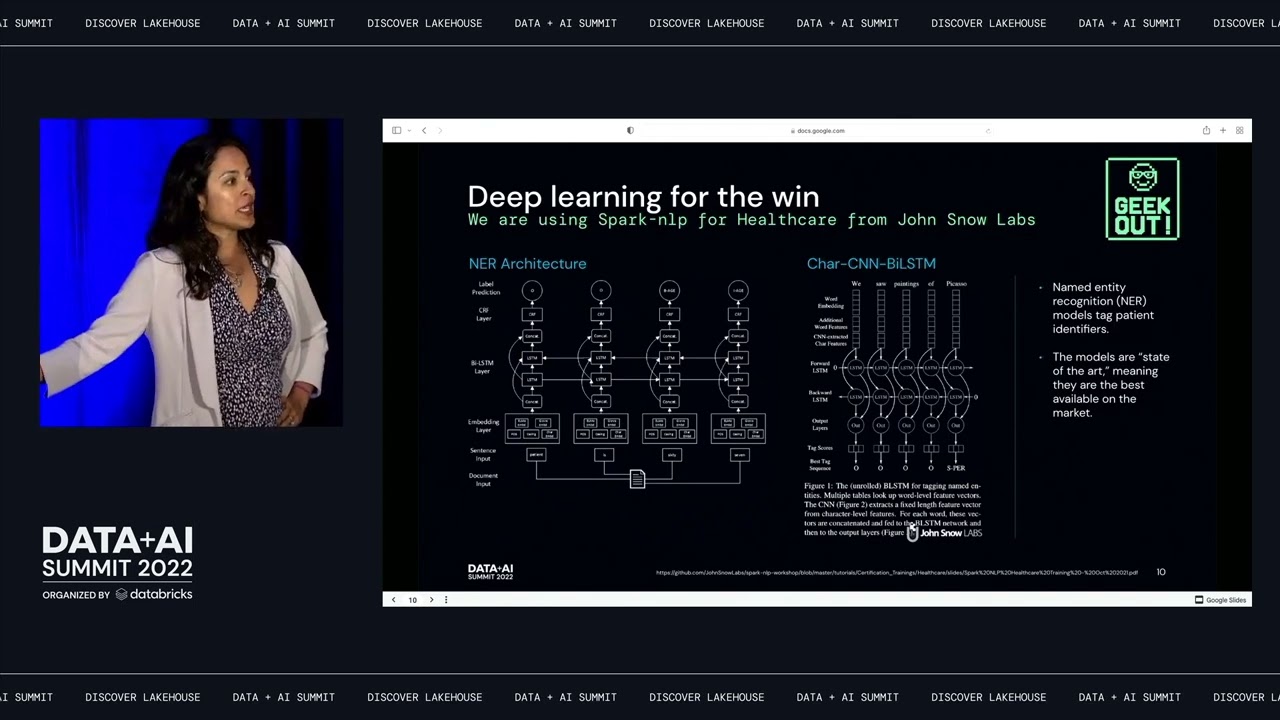
Lessons Learned from Deidentifying 700 Million Patient Notes
Providence and Tegria deidentify over 700 million patient notes by using Spark NLP for Healthcare on Databricks to tag and obfuscate protected health information. The process requires data sampling, human annotation, and equity analysis to evaluate and improve model performance and privacy protection.
 News
dbt + Machine Learning: What Makes a Great Baton Pass?
dbt integrates with Databricks and machine learning workflows to streamline analytics processes and enhance collaboration between analytics engineers and data scientists. The demonstration shows how dbt can manage data pipelines and machine learning configurations using SQL and Python.
 News
Fine Tuning and Enhancing Performance of Apache Spark Jobs
Apache Spark defaults perform decently on large data sets, but tuning parameters to the resources and job can bring significant gains. Best practices from real-world problems cover garbage collector selection, serialization, executor counts, partitioning and skew, fair scheduler pools, Java heap settings, reading Spark UI DAGs for bottlenecks, and optimizing joins.